 Bjorn3D.com Bjorn3d.com – Satisfying Your Daily Tech Cravings Since 1996

Testing
We run Intel’s Burn Test to test our ID-COOLING ICEKIMO 240W White AIO setup and the testing is pretty straight forward. We run Intel’s Burn Test for 15 minutes, make a note of the temperature, then wait 30 minutes and run it again. We repeat the process three times and average the results.
Test Rig
| Test Rig “Quadzilla” |
|
| Case Type | |
| CPU | Intel Core I7 5820K 4 – 4.4GHz |
| Motherboard | Asus Pro X99 |
| RAM | Kingston HyperX Savage 3000MHz DC (15 16 16 39) |
| CPU Cooler | ID-COOLING ICEKIMO 240W |
| Hard Drives | |
| Optical | Liteon DVD Burner |
| GPU | ASUS ROG Strix GeForce GTX 1070 8GB |
| Case Fans | 1 x 180mm Mosfet / CPU / RAM cooling fan 1 x 120mm PCI-E Cooling Fan |
| Docking Stations | None |
| Testing PSU | |
| Legacy | None |
| Mouse | |
| Keyboard | |
| Any Attempt Copy This System Configuration May Lead to Bankruptcy | |
Testing Results

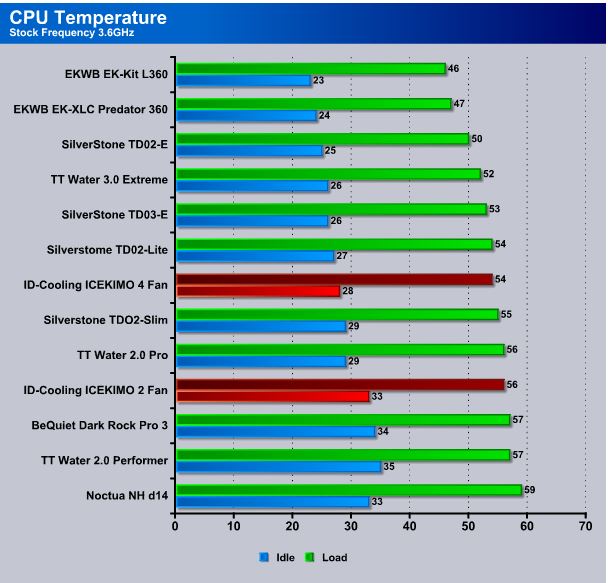
At stock speed, with the 5620K, the ICEKIMO 240W held the line with two fans at 33 Idle and 56 Load which is in line with other dual-radiator IAO coolers.
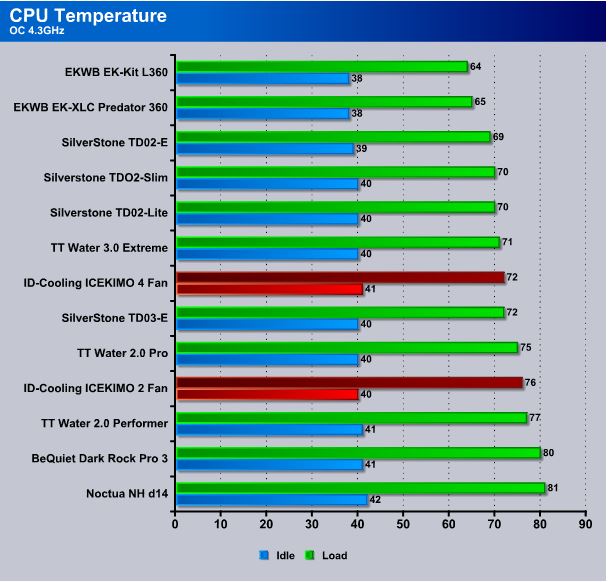
Here at 4.3GHZ the 5620K was heating up some and we got 40°C Idle and 76°C Load with two fans. Swap up to four fans and we dropped a healthy 4°C to 72°C, but this is as high as the ICEKIMO would go on our 5620K, as it gets a little voltage hungry at 4.4GHz and all the dual-radiator coolers we tested failed, reaching our cutoff temperature of 90°C.
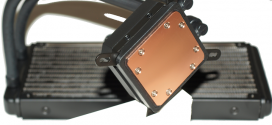




Wow, this is a beast for cooling. I hope it is not too expensive I would like to buy one.